Blog5 min read
Meta delayed its ad terms. Not its defaults.
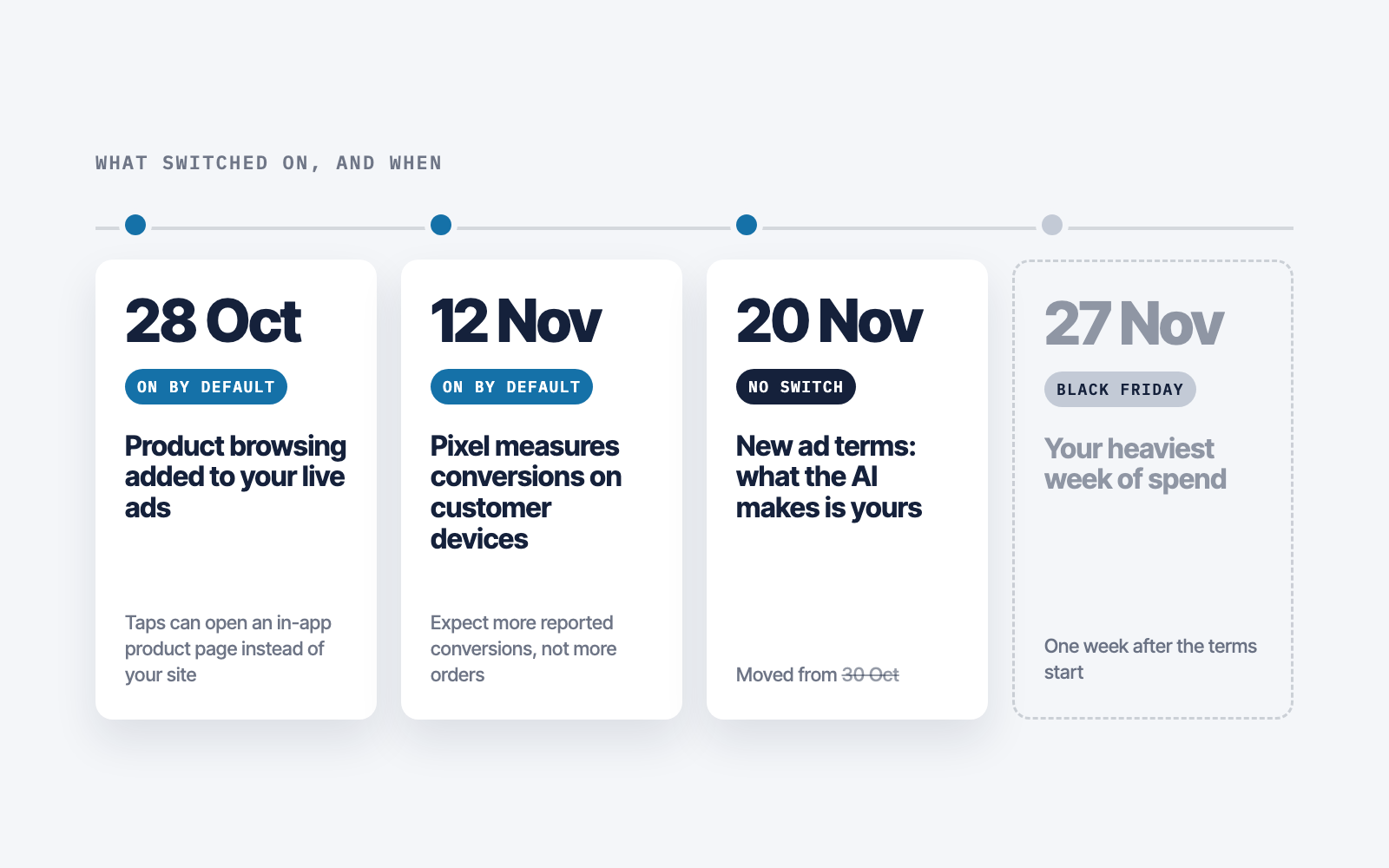
The new ad terms now start on 20 November. In the same weeks Meta switched product browsing on in live ads and a new Pixel setting on by default. Here is what to check.

Last month we wrote that Meta's new ad terms would take effect on 30 October. They did not. Meta moved the date for both its Commercial Terms and its Self Serve Ad Terms to 20 November. A Meta spokesperson told Nieman Lab the delay was “to allow more time for us to explain to our partners and stakeholders what's changing and what's not.”
The contract waited. The product did not. While the terms sat in preview, Meta switched one feature on inside ads that were already running and set another to switch itself on in your Pixel on 12 November. Neither needed you to do anything.
Why the terms moved
The delay was about publishers, not advertisers. The new terms let Meta crawl websites linked to a business account, and news organisations objected. The Movement for an Open Web asked the European Commission and the UK Competition and Markets Authority to block the terms while they investigate. WAN-IFRA asked Meta to pause the clause for news publishers. The European Alliance of News Agencies asked for it to be removed.
Meta made one change to the text, on 16 October. It removed the word “train” and limited crawled content to “advertising and business products”. After that only the date moved. The Commission says it will assess the complaint. No regulator ordered the delay. Meta chose it.
For advertisers, the parts that matter are unchanged. Meta's AI features “may make mistakes and may not always produce accurate, complete, or suitable results.” You “assume any and all risks” of those features and anything they produce. That language now starts on 20 November.
Product browsing went live on 28 October
In mid October Meta emailed advertisers a notice headed “Starting October 28, 2026, we'll add product browsing to your existing ads.” Product browsing is an Advantage+ creative enhancement. When someone taps your ad, Meta can show them an in-app page with product information and personalised suggestions, instead of sending them straight to your site.
The notice gives one reason: “On average, businesses saw 3% more conversions” in an experiment run from 6 to 21 August across about 117,700 advertisers. It does not say which conversions, measured how. PPC Land could find no Help Center page or newsroom post about the change, so the notice is the only record.
If you did not click opt out before 28 October, assume it is on. That matters most where your landing page does the selling. A quiz, a bundle, an offer page or a lead form does work an in-app product sheet cannot. One media buyer, David Herrmann, put it simply: the feature “turns ANY creatives essentially into dynamic product ads”.
The Pixel changes on 12 November
Open your Pixel's settings in Events Manager and there is a new switch, “Measure conversions on customer devices”, already on. Under it Meta says: “With this feature on, that measurement happens on your customer's device instead of exclusively on Meta servers.” It applies to datasets already sending events, and the panel says measurement starts on 12 November.
As reported, matching uses the email address the customer gave you and temporary device data, both kept on the device. Meta receives that a purchase happened and which campaign gets the credit. Meta has not said whether those recovered conversions feed bidding or only reporting. Reports citing Meta's help pages say it does not run for people in the EU or UK.
Expect Meta to report more conversions from 12 November. More reported conversions are not more sales. We have written before that platform reporting is wrong in both directions, and this is a new way for it to move. A jump in reported purchases that week will look like Black Friday working, and it may only be measurement.
What a default does in a live account
Adweek reported what this looks like in practice. Bookshop.org said an automated account update opted it into a generative AI feature, which added an AI illustration to an ad people had made. “This particular ad was ‘enhanced’ (or ruined, really) by Meta without our knowledge,” it posted. It has since turned off all of Meta's AI ad features. The agency Exverus pulled live ads after sitelinks, translated copy and AI images appeared, some on ads where the feature had not been enabled.
Asked whether advertisers are liable for AI features they never switched on, a Meta spokesperson did not answer directly. The answer given was that advertisers can turn off individual Advantage+ features in Ads Manager at any time. Under the new terms that is the whole arrangement: Meta can switch it on, you have to notice, and the result is yours.
What to check before 20 November
- Product browsing. Open each live ad, find product browsing in the Advantage+ creative and destination settings, and decide per ad. Leave it on for catalogue browsing. Turn it off where the landing page does the selling.
- A Pixel baseline. Before 12 November, write down Meta's reported purchases next to your store's real orders for the same days, for each Pixel. Compare again the week after. If Meta's count rises and orders do not, you are looking at measurement, not demand.
- The Pixel decision. Decide whether to keep on device measurement with whoever owns your privacy policy, and check the policy still describes what your Pixel does. The switch is in Events Manager, under the dataset's settings, and it can be turned back on later.
- Every enhancement. Open the collapsed menus in Advantage+ creative on every live ad, not only new ones, and screenshot what is on. Account updates have switched features on before.
- A date in the calendar. Recheck all of it on 20 November, then again before your Black Friday creative goes live on the 27th.
The obvious objection
Here is the best case for Meta. A 3 percent lift across more than a hundred thousand advertisers is a real test. On device matching recovers sales that really did come from ads and were lost to browser privacy rules. Defaults exist because most advertisers never touch a setting, and for the average account these probably help.
That may be true, and it is not the question. The average account is not yours, and the new terms do not cover the average account. They cover yours. A default you chose to keep is a decision. A default you never saw is a risk Meta has written down as yours.
Meta gave itself three more weeks to explain the terms. Use them to read your own account first.